The Right MIDI Pack Makes a Real Difference When You're Starting Out
As a beginner, the biggest obstacle to finishing tracks isn't technical — it's musical. You open your DAW, stare at an empty session, and don't know where to start. MIDI packs solve that problem directly: they give you professional chord progressions and melodies to build from so you can focus on sound design, arrangement, and mixing rather than getting stuck at the harmony stage.
But not every MIDI pack is equally useful for beginners. Some packs are complex and assume harmonic knowledge you haven't built yet. Others are too sparse to teach you anything. This guide cuts through that and recommends specific packs that are genuinely beginner-friendly — organised clearly, approachable harmonically, and structured to help you learn while you produce.
Methodology: recommendations are ranked by beginner-friendliness — prioritising clear organisation, accessible harmonic content, genre clarity, and educational value alongside musical quality. Free packs come first, then paid options that offer the best value for a new producer's first investment.
What Beginners Should Look for in a MIDI Pack
All 12 Keys
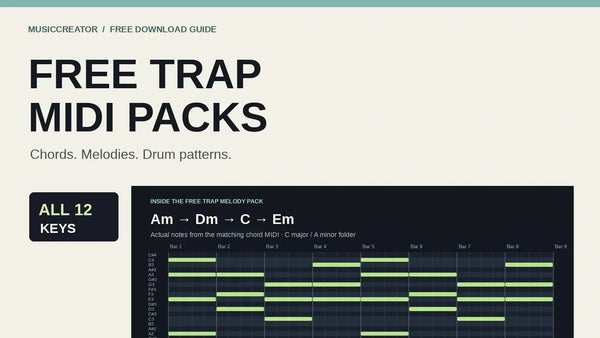
When you're starting out, you often don't know what key to work in until you've found a drum loop or sample that excites you. A MIDI pack in all 12 keys means you can always find a progression that matches your reference material without having to transpose — which, for a beginner, removes a potential point of friction. All MusicCreator packs cover all 12 keys as a baseline.
Clear File Organisation
If files are named "chord_01.mid" through "chord_847.mid," you'll spend more time browsing than producing. Look for packs that organise by key, mood (dark, bright, melancholic, energetic), and optionally by tempo feel. This makes it practical to navigate a large pack without getting overwhelmed — you can go straight to "minor / melancholic / C minor" and find something that fits your session immediately.
Genre Specificity
A beginner making lo-fi beats doesn't benefit from a pack full of jazz chord extensions that serve a completely different production context. Genre-specific packs teach you the harmonic language of the music you actually want to make, which is both more immediately useful and a better musical education. Start with the genre closest to your goal.
Royalty-Free for Commercial Use
Even as a beginner, you might want to share tracks or upload to SoundCloud, YouTube, or streaming platforms. Make sure any pack you use is explicitly cleared for commercial use — not just "free to use" but specifically confirmed as royalty-free. See our royalty-free music guide for what to look for.
Educational Value
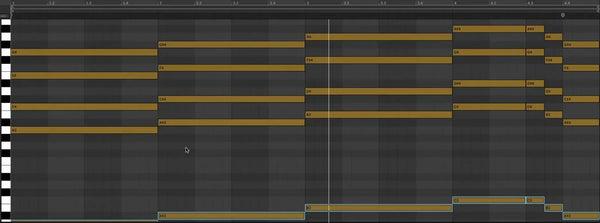
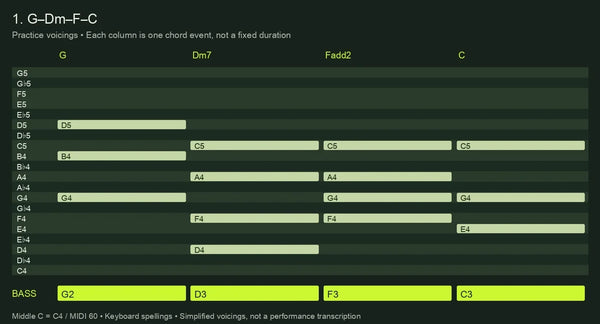
The best MIDI packs for beginners double as a music theory education. When you look at a chord progression in your piano roll, you're seeing the actual notes — which means you can learn what an Am7 looks like, how a ii-V-I movement works, what makes a minor chord sound sad. Over time, this passive exposure to real chord structures builds genuine harmonic knowledge.
Best Free MIDI Packs for Beginners — Start Here
Before spending anything, download these free packs. They're genuinely useful, not stripped-down demos, and they'll give you a clear picture of what MIDI packs can do for your workflow.
- Emotionally rich progressions across multiple styles
- Excellent starting point — works on piano, synth, strings, anything
- All 12 keys, royalty-free commercial use
- Perfect first pack for any genre
- Melody-focused — the hooks that get stuck in listeners' heads
- Strong contour and memorable phrasing
- Pair with chord progressions for complete harmonic + melodic content
- Great for learning how melodic phrasing works over chords
Beyond MusicCreator's free packs, the full free MIDI packs guide covers every free pack in the collection — including genre-specific free packs for hip-hop, lo-fi, EDM, pop, and more.
Best Paid MIDI Packs for Beginners — Ranked
#1 — Pop MIDI Chord Pack — Most Accessible Harmony
Pop is the best genre to learn harmony from because its chord progressions are designed to be immediately emotionally clear. Pop uses the most intuitive chord movements — IV-I resolutions, vi-IV-I-V loops, straightforward major and relative minor progressions — which means beginners learn the fundamentals of Western harmony just by using the pack. Once you understand pop harmony, every other genre makes more sense because pop establishes the baseline that other genres deviate from.
The Pop MIDI Chord Pack contains 3,600+ progressions in all 12 keys. As a beginner, you won't use all 3,600 immediately — but having that volume means you'll find something that fits every mood, energy level, and tempo context without feeling limited. It's an investment in a pack you'll still be opening years from now.
- 3,600+ pop chord progressions
- All 12 keys, all moods and tempos
- Most accessible harmonic language for beginners
- Works for pop, singer-songwriter, indie, commercial music
- 100% royalty-free
#2 — Lo-Fi MIDI Chord Pack — Learn Jazz Voicings Through Production
Lo-fi music is built on jazz-derived chord voicings — maj7, min7, 9th chords, add9 extensions — presented in a production context that makes them feel warm and accessible rather than academic. For beginners, the Lo-Fi Chord Pack is an ideal introduction to extended harmony. You'll hear what a Cmaj7 sounds like in context, understand why a ii7-V7-Imaj7 movement resolves the way it does, and absorb jazz harmonic vocabulary passively while making music.
The Lo-Fi pack also tends to work at slower tempos (60–90 BPM) where the full voicing of each chord is clearly audible — which makes the music theory education more obvious and useful. If you want to understand sophisticated harmony in a practical setting, this is the pack.
- 3,600+ lo-fi chord progressions
- Jazz-derived voicings — maj7, min7, 9ths, extensions
- All 12 keys — perfect for lo-fi beat production
- Great for learning extended harmony in context
- 100% royalty-free
#3 — MIDI Chord Library — Best Value for Variety
If you're not certain which genre you'll focus on, or you want to produce across multiple styles, the MIDI Chord Library is the smartest single investment. It bundles all genre chord packs into one — lo-fi, hip-hop, trap, house, pop, R&B — giving you the full harmonic vocabulary of every major electronic genre in one purchase.
For a beginner, this removes the paralysis of choosing: you have everything, and you can explore freely. Over time you'll naturally gravitate toward the genres you connect with, and you'll already have the chord content for wherever that leads. This is especially good value if you're still figuring out your sound.
- All genre chord packs in one bundle
- Lo-Fi, Hip-Hop, Trap, House, Pop, R&B — all included
- Best value for producers exploring multiple genres
- All 12 keys, 100% royalty-free
- One-time purchase
Using MIDI Packs to Learn Music Theory
One of the most underrated aspects of working with MIDI packs is the passive music theory education they provide. When you drag a chord progression into your DAW, you can open the piano roll and see exactly which notes make up each chord — the root, third, fifth, and any extensions. After working with progressions for a few months, you'll start recognising chord shapes by sight, understanding why certain movements create tension, and knowing intuitively what a "minor" vs "major" vs "seventh" chord looks like.
Here's a practical approach: each time you use a progression you like, spend two minutes looking at the piano roll and identifying the chords. Ask yourself — what key is this in? Are these major or minor chords? Why does this chord movement feel the way it does? Over time, these observations build real music theory knowledge without any formal study.
MIDI packs also let you experiment with theory in reverse — change one note in a chord and hear what that does. Raise the third by a semitone and a minor chord becomes major. Add a note a seventh above the root and hear how that changes the feeling. This kind of hands-on experimentation is one of the fastest ways to develop harmonic intuition, and MIDI makes it immediate and audible rather than abstract and theoretical.
How to Use MIDI Packs in Your DAW
The process is straightforward regardless of which DAW you use. Drag the .mid file from the pack onto an instrument track in your DAW, and the MIDI data will load automatically. You'll need at least one virtual instrument — your DAW's stock piano or synth is fine to start with.
For more detailed instructions for your specific software, see these guides:
Frequently Asked Questions
Do I need to know music theory to use MIDI packs?
No — that's one of the main reasons MIDI packs exist. They handle the harmonic structure so you can focus on the production side: choosing sounds, layering elements, building arrangements, and mixing. That said, working with MIDI packs naturally builds music theory knowledge over time — you start recognising chord shapes, understanding key relationships, and developing harmonic intuition simply by looking at progressions in your piano roll and experimenting with variations.
Which DAW is best for beginners using MIDI packs?
MIDI packs work identically across all DAWs, so the best DAW is whichever you're already using or most comfortable with. For beginners, GarageBand (free on Mac) and FL Studio (intuitive pattern-based workflow) are common starting points. Ableton Live is excellent for loop-based production. Logic Pro is a strong choice if you're on Mac and want depth. The MIDI workflow is the same across all of them — drag the file, assign to an instrument, play.
How many MIDI packs should a beginner start with?
Start with one free pack and spend a few sessions really working with it before buying anything. Download the Beautiful Free MIDI Chord Progressions pack, load progressions into several different virtual instruments, and finish at least one complete (if rough) track using only that content. Once you've done that, you'll have a much clearer sense of what genre you want to focus on and which paid pack would genuinely serve your workflow — rather than buying speculatively and ending up with packs you don't use.
Can I edit MIDI pack files to make them my own?
Absolutely — and you're encouraged to. MIDI files are completely editable: you can add notes, remove notes, change velocities, adjust timing, transpose individual notes, extend progressions, or use just one bar of a four-bar progression. Most producers use MIDI pack content as a starting point rather than a finished product. Even small edits — adding a passing note, changing the voicing of one chord, adjusting the rhythm — make a progression feel distinctly yours. There are no restrictions on editing.
What virtual instrument sounds work best with MIDI packs for beginners?
Start with what you already have in your DAW — every major DAW includes stock piano and synth instruments that work perfectly well with MIDI packs. Ableton's Grand Piano preset, Logic's Steinway piano, FL's FLEX presets — all of these will produce usable results immediately. As you develop, you might invest in a dedicated piano library (like Keyscape or an NI Kontakt piano) or a versatile synth (like Serum or Vital — the latter is free). But stock instruments are more than good enough to start with and produce professional-sounding work.